EosHQ
EosHQ Chat: Sales and project work in conversation
Manage leads, update deals, coordinate projects, and run enabled Agents from WhatsApp, Slack, or the EosHQ web app.
Ask for context. Act on what matters.
| Your work | What to do through Chat |
|---|---|
| Sales | Create leads and opportunities, retrieve customer context, update records, and record follow-up activities. |
| Outbound | Design a campaign, review its audience, inspect conversations, prepare replies, and control execution. |
| Projects | Ask about overdue work and staffing, update task dates and status, add comments, and log time. |
| Agents | Run eligible published Agents using your organization’s instructions and permissions. |
A conversation can lead to a record change.
“Show my open opportunities.”
“Move the design review to Friday and note that the drawings are delayed.”
“Log two hours against the Northstar project.”
EosHQ resolves the relevant records, asks for missing information, and returns the result. For actions that require approval, review the proposed work before it proceeds.
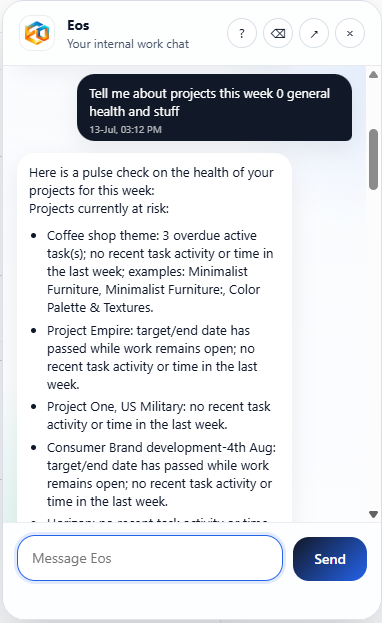
Project context in the conversation.
Connect your team once.
Configure the channel integration and link each person to their EosHQ membership. Their role, record access, enabled Skills, and connected services determine what they can do.
Use WhatsApp or Slack for conversational work. The web app remains available for setup, detailed review, visual planning, and administration.
Choose a workflow to explore.
See it with your sales or project work.
Bring one example and examine the actions, records, and controls that matter to your team.